Review Comments (0) Screenshots (12) Questions & Answers (0) Votes (3) Awards (14) Wiki  
-Please log in to rate
4.7 4.7/5 (3)
-Avery Lee
-1.9.6
-www.virtualdub.org
-Freeware
- 3 575 people
Download VirtualDub

Downloaded 689 times


Review

This is a quick review

VirtualDub is a video capture/processing utility for 32-bit Windows platforms (95/98/ME/NT4/2000/XP), licensed under the GNU General Public License (GPL). It lacks the editing power of a general-purpose editor such as Adobe Premiere, but is streamlined for fast linear operations over video. It has batch-processing capabilities for processing large numbers of files and can be extended with third-party video filters. VirtualDub is mainly geared toward processing AVI files, although it can read (not write) MPEG-1 and also handle sets of BMP images.
 
The following full-length review applies to version 1.5

VirtualDub is a freeware application designed for the video edition, is a tool under a GNU General Public License. It has multiple options and usage; it had been supported from Windows 95 to XP.

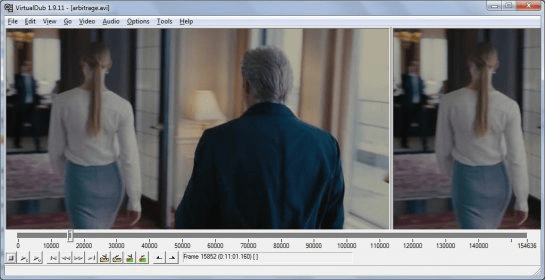
It helps to personalize our videos, merging or cutting them supporting different types of video compressions. Two preview panels are included letting us verify the quality of the original video, and the changes applied to the video.

The software is very versatile, it include preload filters for the configuration of the video sides, grayscale, vertical or horizontal flip, inclusion of images (logo, etc) and position of them, also the load of external filters providing multiple perspectives of what we can modify in our videos… include subtitles, run images or videos inside other videos, etc.

By personal experience the timeframe to process the videos could vary depending on the quality and modifications but the results always are the bests, you can get more information of this software on their website.
Advantages
  • Freeware.
  • Doesn’t need to be installed, just download and run.
  • Multiple functions and options.
Disadvantages
  • It’s an old version.
  • Needs an installation, or presence of codec in the system to load properly the videos.
  • Timeframe of the conversion is not the best.

Reviewed by: Jose Ruiloba

Reviewer rating: Editor's rating 5

Screenshots

Audio Interleave Audio Interleave Main Window Main Window Video Compression Video Compression General View General View
All 12 screenshots

Latest comments


There are no comments, be the first one!
Add new comment
Tag cloud
Download siClient

Email Address:

Password:

Register now »

Forgot password?

Copyright © 2009, Informer Technologies, Inc. About| Privacy and terms| Help| Feedback